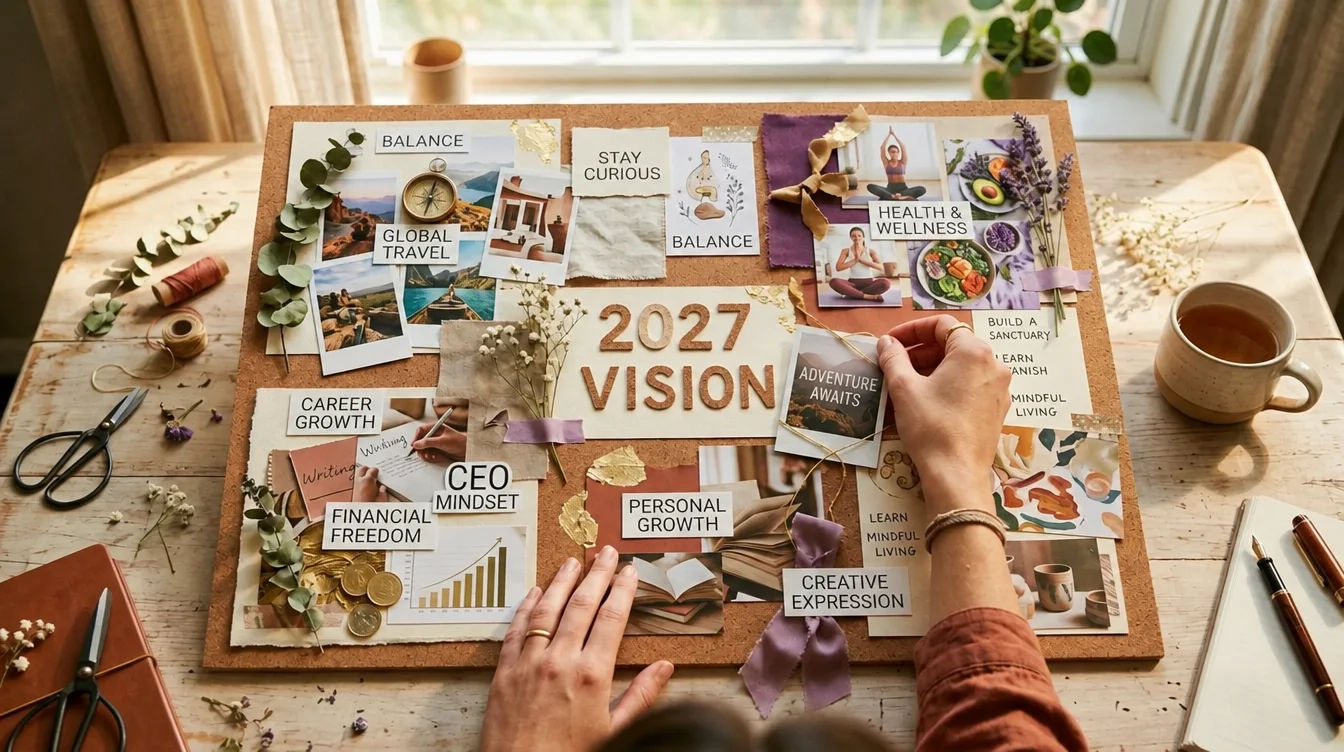

Vision Board Wallpaper for Your Phone

Vision board wallpaper puts your goals on your phone screen. Get the right size, a layout that clears the clock, and exact steps for iPhone, Pixel and Samsung.

Vision Board Wallpaper for Your Phone
In this guide 12 sections
  1. 01What Is a Vision Board Wallpaper?
  2. 02What Size Should a Vision Board Wallpaper Be?
  3. 03Should Your Vision Board Be the Lock Screen or Home Screen?
  4. 04How Do You Set a Vision Board as Your iPhone Wallpaper?
  5. 05How Do You Set a Vision Board as Your Android Wallpaper?
  6. 06How Do You Design Around the Clock and Widgets?
  7. 07One Wish or Nine? How Do You Choose a Layout?
  8. 08What Should the Words on Your Wallpaper Say?
  9. 09Does Looking at Your Wallpaper Actually Help?
  10. 10How Can You Make Wallpaper With Photos of Yourself?
  11. 11How Often Should You Change Your Vision Board Wallpaper?
  12. 12Sources & Methodology

Vision board wallpaper is a picture of the life you want, set as the background of your phone. It can be one image or a grid of several. You check your phone dozens of times a day, so your goals stay in front of you without any extra effort.

You can make one in ten minutes. The details that matter are the size, the layout around the clock, and the right steps for your phone.

Key Takeaways
  • Set your board as the lock screen. It is the screen you see most, and no app icons cover it.
  • Export it tall, about 1320 ร— 2868 pixels, so it fits any current phone without blur.
  • Keep faces and key words out of the clock zone at the top and away from the bottom buttons.
  • Choose one wish or a small grid. Fewer, clearer pictures work better than a crowded collage.
  • Use photos of you living the wish, not only stock images. It makes the goal feel yours.
  • A wallpaper is a reminder. Pair each glance with one small step.

What Is a Vision Board Wallpaper?

A vision board wallpaper is a vision board sized for a phone screen. Instead of a poster on the wall, your goals sit behind your apps or your clock. Some people use one big picture of a single wish. Others use a tidy grid of six or nine, one for each area of life.

The idea is simple: most of us unlock a phone far more often than we look at a wall. If you want the basics of building a board first, read how to make a vision board or browse vision board ideas. Come back here when you are ready to put it on your screen. If you have not made the board yet, a free vision board template, a Canva vision board or a digital vision board all export cleanly to phone size, and a vision board app can do it from your phone.

What Size Should a Vision Board Wallpaper Be?

Aim for a tall image of about 1320 by 2868 pixels. Apple's own comparison page lists current iPhone screens from 2340 by 1080 pixels up to 2868 by 1320 pixels (Apple iPhone comparison). A file at the top of that range shrinks cleanly onto smaller screens.
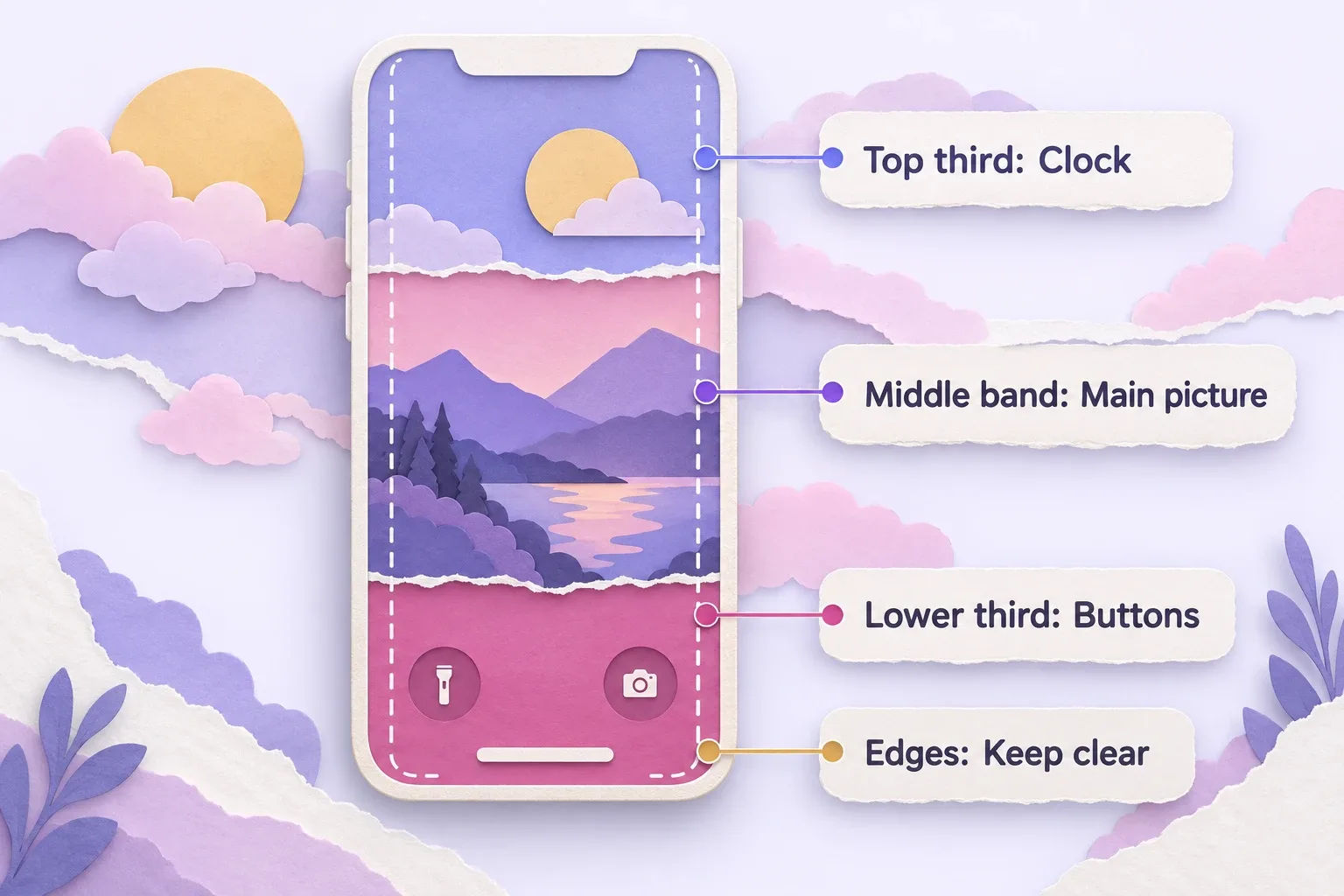
Vision board wallpaper layout guide showing clock, main picture, buttons and edges on a phone screen

Android phones vary more, so there is no single number. What matters is the shape. Phone screens are tall and narrow, roughly twice as tall as they are wide. If you upload a wide photo, the phone crops it to fill the screen and you lose the sides.

A few size rules that save trouble:

  • Start tall. Make the canvas taller than it is wide, in portrait.
  • Go big, not small. A small image gets stretched and looks soft. It is easy for a phone to shrink a big file. It cannot add sharpness.
  • Leave a margin. Phones crop slightly, and you can zoom or drag the picture into place as you set it.
  • Save as PNG or high-quality JPEG. Skip screenshots of screenshots, which lose quality.

Menus and screen shapes change with each system update. If a step below looks different on your phone, search your phone's settings for "wallpaper".


Should Your Vision Board Be the Lock Screen or Home Screen?

Put your vision board on the lock screen. That is the screen you see each time you pick up your phone, and only the clock and a few widgets sit on top. Your home screen is crowded with app icons, so a detailed board gets lost there.

Vision board wallpaper shared on a phone by a father and his son on a cabin porch

A good split looks like this:

  • Lock screen: your vision board or your one wish for the season.
  • Home screen: a plain color, a soft blur or a calm photo, so the icons stay easy to read.

iPhone even lets you tie a wallpaper to a Focus, so a different picture appears when that Focus is on. Apple explains that you can link your Lock Screen to a particular Focus and the wallpaper switches when you turn that Focus on (Apple Support). Try one wish for work hours and another for evenings.

How Do You Set a Vision Board as Your iPhone Wallpaper?

Save the picture to Photos, open Settings, tap Wallpaper, tap Add New Wallpaper and choose Photos. Pick your image, tap Add, then choose Set as Wallpaper Pair to use it on both screens. Tap Customize Home Screen if you want a different look behind your apps.

Here are the steps, following Apple's guide (Apple Support: Change the wallpaper on iPhone):

  1. Save your vision board image to your Photos app.
  2. Open Settings and tap Wallpaper.
  3. Tap Add New Wallpaper, then tap Photos at the top of the gallery.
  4. Choose your vision board picture and move or zoom it into place.
  5. Tap Add.
  6. Tap Set as Wallpaper Pair to use it on the Lock Screen and Home Screen.
  7. To change only the Home Screen, tap Customize Home Screen instead. There you can pick a color, choose a custom photo, or select Blur so your apps stand out.

How Do You Set a Vision Board as Your Android Wallpaper?

On a Pixel, touch and hold an empty space on the home screen, tap Wallpapers & style, then Change wallpaper and Choose a photo. On a Samsung Galaxy, touch and hold the home screen, tap Wallpaper and style, then Change wallpapers and Gallery. Both let you set the lock and home screens separately.

Google Pixel

Google's steps (Pixel Phone Help):

  1. Touch and hold an empty space on your Home screen.
  2. Tap Wallpapers & style, then Change wallpaper.
  3. Tap Choose a photo and pick your vision board.
  4. If the option appears, choose whether it goes on the Lock screen, the Home screen or both.
  5. Tap Preview, then Apply.

Samsung Galaxy

For the lock screen, Samsung says to touch and hold the Lock screen and enter your security details, tap Wallpapers, then Gallery, and choose your picture. Drag it into position, then tap Done. For the home screen, touch and hold a Home screen, tap Wallpaper and style, then Change wallpapers and Gallery. Pick the picture, tap Done, drag to position it and tap Done again (Samsung Support).

How Do You Design Around the Clock and Widgets?

Keep the most important part of your picture out of the top third of the screen, where the clock sits, and away from the bottom corners, which hold shortcut buttons. Place faces, words and your main subject in the middle band. Then lock your phone and look before you commit.

Different parts of the screen do different jobs:

Screen area What sits on top What to put there
Top third Date, clock, widgets Sky, background, soft texture
Middle band Notifications appear here Your main picture or face
Lower third Notification stack, flashlight and camera buttons Extra detail, or leave calm
Edges Phones may crop Nothing important

Test in two ways. Lock the phone and check the picture. Then send yourself a test message to see how notifications land on top of it. If a notification covers your face, move the picture up or down and try again.

๐Ÿ’กSix Phone Vision Board Layouts
0 of 6 explored

One Wish or Nine? How Do You Choose a Layout?

Choose one wish if you want the strongest focus, and a grid of up to nine if you want your whole year in view. A single big picture is easy to read in a glance. A grid shows more of your life, but each square is small. Many people mix both across the year.

Vision board wallpaper layouts being compared on a phone by a woman on a city balcony

Layouts that work well:

One hero image

One picture of one wish, with plenty of quiet space for the clock. Scenario: Maya wants to run a spring half marathon. Her lock screen shows one photo of her at a finish line, with a short line under it. Every unlock is a small nudge to lace up.

A three-by-three grid

Nine small pictures, one per life area. Use it as a home-screen background or a quick overview. Keep the gaps between squares thin, and drop long captions. You will not read tiny words on a phone.

A weekly rotation

Make one wallpaper per wish and swap it each Sunday. Scenario: Daniel has six wishes for 2027, so his lock screen changes weekly. By the time he sees the same picture again, it feels fresh, not like wallpaper he stopped noticing.

Picture plus one line

One image, one short line of text. It suits people who like a clear instruction beside the dream.

What Should the Words on Your Wallpaper Say?

Use a short line in the present tense that names something specific. Six words or fewer is best, because phone text is small and your eyes skim past long lines. Add a date if it helps, such as "Spring 2027" or "By June." Skip anything you would not say out loud.

Good examples:

  • "I run my first half marathon."
  • "Keys to our first home."
  • "Passport stamped. Lisbon, May 2027."
  • "Calm mornings, every day."

Words that read as a lecture ("Stop being lazy") wear you down over time. Pick a line that makes you want to move toward the picture. If you want to go beyond a reminder, how to manifest covers the methods that pair well with a daily glance. If you like starting from a script, the affirmation generator can help you write a few lines to choose from.

Does Looking at Your Wallpaper Actually Help?

A vision board wallpaper can help as a reminder, not as magic. Research supports parts of the idea: writing goals down, and picturing an action, both seem to help people follow through. The wallpaper does not do the work for you. It brings the goal back to mind many times a day.

Here is what the research does and does not say:

  • Written goals. In a small 2015 study by Gail Matthews, people who wrote goals down and sent weekly updates to a friend did best: 76% reached or got more than halfway to their goals, against 43% of people who did not write them down. It was presented at a conference and was not peer reviewed, so treat it as a hint, not proof (Matthews summary).
  • Mental pictures. Imagining an action uses many of the same brain areas as doing it (Kosslyn, Ganis and Thompson, 2001; see also mental imagery on Wikipedia). A clear image gives your imagination something to hold.
  • Habits take time. New habits took an average of 66 days to feel automatic, with a range of 18 to 254 days (Lally et al., 2010). Give your wallpaper a couple of months before you judge it.

It does not show that looking at a picture brings results by itself. For more, read do vision boards work?. Vision boards are a mindset practice, not a substitute for medical, mental-health or financial advice.

A simple habit turns the wallpaper into action. Each time you unlock your phone, name one small step you can take today toward the picture. It takes three seconds.

How Can You Make Wallpaper With Photos of Yourself?

Use pictures of you in the scene, not only stock photos of strangers. When you see yourself on a beach, on a stage or at a new front door, the goal feels like yours. The idea has a name: seeing your future self as a real person you can step toward, not an abstract goal.

With Manifest Mosaic, you write what you want from 2027, add one selfie, and get photos of yourself already living it. Your first photo is free. The full board is nine photos of you (one per wish), a print-ready poster, phone wallpapers, three free swaps and 30 morning letters from your future self, for $19, paid once. There is no subscription.

If you would rather build it by hand, the free route works too: pick your images, drop them into a tall canvas, and follow the steps above. See the 2027 vision board guide for what to include, and think about it alongside your 2027 resolutions.

How Often Should You Change Your Vision Board Wallpaper?

Change it when a wish is done, when your goals shift, or when you stop noticing it. For most people that means every month or every season. If you rotate one wish a week, the change is built in. Review the whole board at the start of each month.

A simple rhythm:

  1. Sunday evening: pick this week's wish and set the wallpaper.
  2. Each unlock: glance, feel it for one breath, name one step.
  3. First of the month: check what moved, and update any wish that no longer fits.
  4. When a wish comes true: replace it with the next one, and keep the old picture in a folder as proof.

See yourself living it in 2027 โ€” make your first picture free โ†’

Sources & Methodology

Apple, "Change the wallpaper on iPhone," Apple Support โ€” the iPhone steps, Wallpaper Pair, Home Screen options and Focus linking.

Apple, "Compare iPhone models" โ€” the range of current iPhone screen resolutions used for the size advice.

Google, "Change wallpaper on your Pixel phone," Pixel Phone Help โ€” the Pixel steps.

Samsung, "Set photos or videos as wallpaper on a Galaxy phone or tablet" โ€” the Galaxy lock screen and home screen steps.

Matthews (2015), goals research summary, Dominican University โ€” the small study on writing goals down.

Methodology: device steps and screen sizes were read from each maker's support pages on September 29, 2026. Menus change between software versions, so your phone may differ slightly. Layout and design advice is practical guidance, not research findings.

Questions

Frequently asked questions

Make it tall and narrow, about 1320 by 2868 pixels. Apple lists current iPhone screens from 1080 by 2340 up to 1320 by 2868, and phones shrink or crop a larger image to fit. Keep the important parts near the middle.

Use the lock screen. You see it every time you wake your phone, and no app icons cover it. Keep your home screen calm, plain or blurred, so your apps stay easy to read and your board stays the star.

Yes. On iPhone, tap Customize Home Screen after adding a wallpaper. On Pixel, pick Lock screen or Home screen when you choose the photo. On Samsung, set each screen on its own through Wallpaper and style.

One to nine. A single wish gives the strongest focus. A three-by-three grid holds nine wishes but each one is small. Many people use one wish on the lock screen and rotate it weekly through the year.

It works as a reminder, not as magic. Seeing your goal often keeps it in mind, and research on written goals and mental imagery supports parts of that idea. The wallpaper helps most when each glance leads to one small action.

Your first picture is free

See yourself in 2027.

Write what you want from next year, add one selfie, and see a photo of you already living it. Then turn all nine wishes into your board.